Salvus 0.11.16
This release comes with several improvements regarding data selection and inverse modeling.
There are no breaking changes in the stable API. However, the window selection in SalvusProject has been completely rewritten, and is not compatible with previous versions.
The new DataSelectionConfiguration allows window- and station-dependent
weights. Furthermore, there are several new options for visualization and
quality control of misfits. See the Seismological Gradient tutorial in the
Experimental section for several examples.
The mapping function has been extended to offer built-in support for a region of interest, and event-dependent masking of sources and receivers to mitigate singularities in the sensitivity kernels.
A new function for uniform mesh refinement and model interpolation has been
added to SalvusMesh.
There are several more small changes documented below.
Changes
Added a new low level EventWindowAndWeightSet class. It is a per-event data
structure that can be serialized to disc that is able to store interval
windows (e.g. windows that have a start as well as an end time). Additionally
it can store weights at the receiver, component, as well as the individual
window level.
In most cases this will be utilized through SalvusProject but it can be
used outside of it and it directly integrates with SalvusFlow’s Event and
EventMisfit infrastructure.
Added ability to create SmoothieSEM meshes with surface as well as Moho topography, ellipticity and ocean loading. Includes several minor bugfixes to the SmoothieSEM meshes introduced in the previous release.
sm = sn.simple_mesh.SmoothieSEM()

sm.basic.model = "prem_iso_one_crust"
sm.basic.min_period_in_seconds = 200.0
sm.basic.elements_per_wavelength = 2.0
sm.basic.number_of_lateral_elements = 2

sm.advanced.tensor_order = 4

sm.source.latitude = 38.82
sm.source.longitude = 40.14

# Ellipticity.
sm.spherical.ellipticity = 0.0033528106647474805

# Surface topography.
sm.topography.topography_file = "topography_earth2014_egm2008_lmax_256.nc"
sm.topography.topography_varname = (
    "topography_earth2014_egm2008_lmax_256_lmax_16"
)

# Moho topography.
sm.topography.moho_topography_file = "moho_topography_crust_1_0_egm2008.nc"
sm.topography.moho_topography_varname = (
    "moho_topography_crust_1_0_egm2008_lmax_16"
)

# Ocean loading.
sm.ocean.bathymetry_file = "bathymetry_earth2014_lmax_256.nc"
sm.ocean.bathymetry_varname = "bathymetry_earth2014_lmax_256_lmax_16"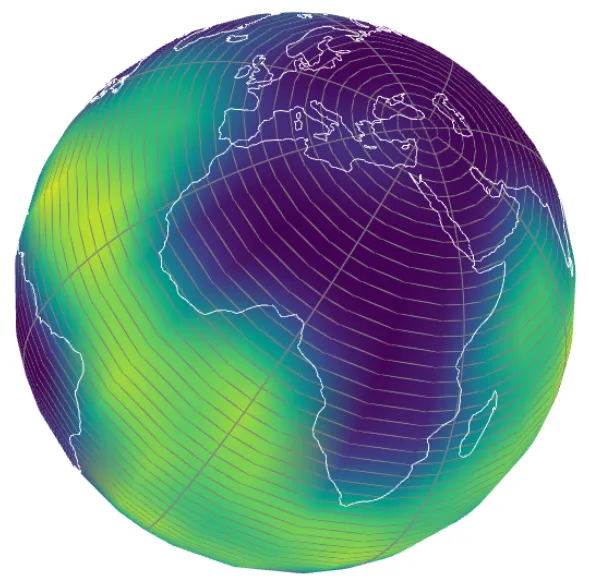
Added a function to uniformly refine any mesh to double its element count along each dimension and thus doubles its resolved frequency. This should work for arbitrarily complicated meshes including discontinuities. Material parameters will be interpolated onto the new elements.
from salvus.mesh.tools.transforms import uniformly_refine

new_mesh = uniformly_refine(mesh, tensor_order=2)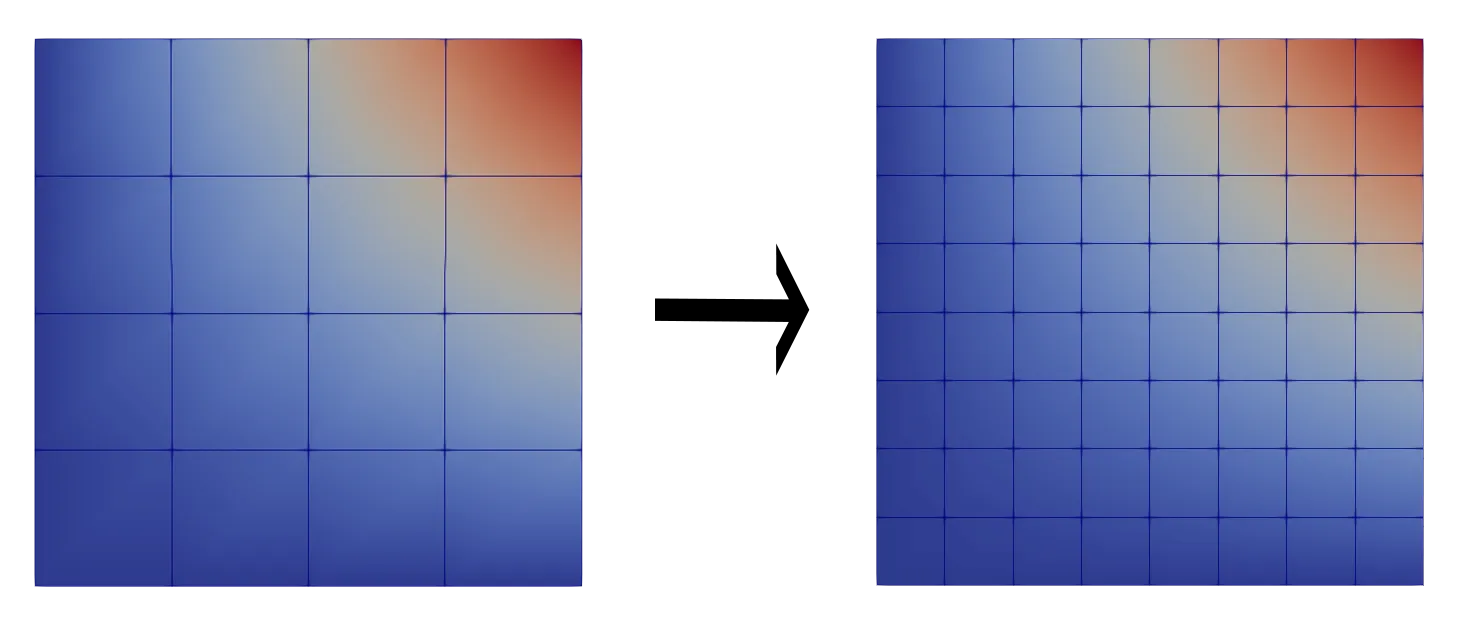
Changes to Experimental Features
Include the reference frame in the HDF5 gradient output files.
Added features for defining a region of interest and for cutting around sources and receivers in the adjoint mapping function.
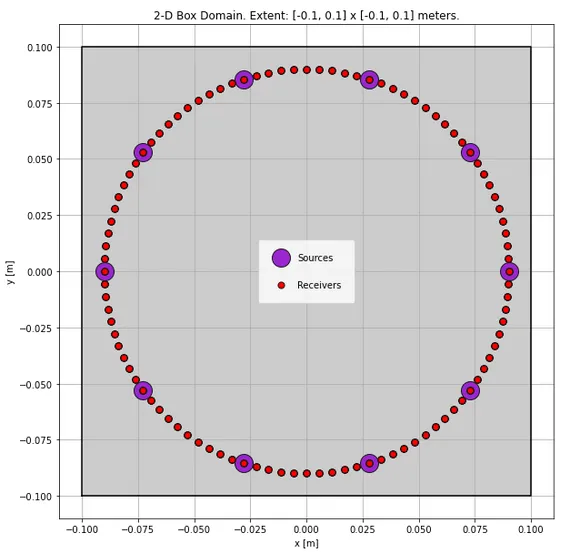
Implement p.viz.nb.domain() method for 2D box domains.
Move job submission settings to the InverseProblemConfiguration and
enable different site configurations for simulations and the preconditioner.
The previous way of providing site_name, ranks_per_job and
wall_time_per_job_in_seconds through the iterate and resume functions
still work, but will be deprecated in the future.
Add interactive misfit plots to the inverse problem Jupyter notebook widget.
Better workflow management for misfit and gradient computations. The newly added functionality ensures consistent settings for site name and the number of ranks and automatically resubmits simulations if the checkpoints are no longer available.
With very large models and / or meshes, interpolating volumetric models can
take some time. Here a ‘verbose’ argument is now accepted by
toolbox.interpolate_spherical, which will print a progress bar if the
verbosity is 1 or greater. The verbose behavior is the default when
generating spherical meshes with project.
Better error handling and management of entities using
UnstructuredMeshSimulationConfiguration objects.
Adding an already existing inverse problem configuration again with exactly the same parameters will no longer throw.
Projects created with an older Salvus version using the windows component
cannot be imported anymore.
The windows component has been removed in favor of a more generic
DataSelectionConfiguration. This is for one more in line with the rest of
SalvusProject but also more powerful and flexible.
A direct consequence is that any function or object that took a
window_set_name argument now takes a data_selection_configuration
argument.
A DataSelectionConfiguration is either a function that is applied on the
fly to select pieces of data (think generalized windows and weights) or one
EventWindowAndWeightSet set per event (or a combination of both).
Projects that used an on-the-fly temporal weighting/windowing function now have
to use it by creating a new DataSelectionConfiguration with an attached
data_selection_function. The function itself does not have to be changed.
p.add_to_project(
    sn.DataSelectionConfiguration(
        name="mute_with_direct_phase",
        receiver_field="phi",
        data_selection_function=mute_with_direct_phase,
    )
)
The pick_windows() seismological action also requires changing
window_set_name to data_selection_configuration (if that configuration
does not yet exist, it will be created). In addition the
window_taper_width_in_seconds argument is now exposed and required. It
controls the width of the taper for the windows.
p.actions.seismology.pick_windows(
    data_selection_configuration="custom_windows",
    ...
    window_taper_width_in_seconds=10.0,
)
Salvus contains a lot of convenience functions to pick windows and weight individual receivers but it is also possible to directly operate on these data structures for full control.
# Get the data selection configuration.
dsc = p.entities.get(
    entity_type="data_selection_configuration", entity_name="custom_windows"
)
# If interval windows have been picked before an event, its
# `EventWindowAndWeightSet` can be retrieved.
ewws = dsc.get_event_window_and_weight_set(event=p.events.get("event_0000"))
This can than be used to exert detailed control on everything. Once this has
been done it will be applied in all subsequent steps that utilize that
particular DataSelectionConfiguration.
In  [1]: ewws.receivers
Out [1]:
{'XX.A0000.': {'receiver_weight': 1.5462720296177797,
  'components': {'Z': {'component_weight': 1.0,
    'windows': [{'window_start': 229.67554,
      'window_end': 1389.219377,
      'window_weight': 1.0}]},
...

In [2]: ewws.receivers["XX.A0000."]["receiver_weight"] = 0.7

In [3]: ewws.write(overwrite=True)Can now add weights to individual receivers and components which will then be applied to each misfit and adjoint source computation. This could have been previously done with a custom windowing function with weights but this is more convenient and easier to control. It is detailed in other changelog items of this release.
It can either happen via window picking and receiver weighting or directly in the data selection function:
def data_selection_function(st, receiver, sources):

    # Receiver and component weights.
    weights = {
        # This is optional but allows to specify additional weights
        # important for the misfit and adjoint source computations.
        "receiver_and_component_weights": {
            # Pass the receiver weight here.
            "receiver_weight": 0.75,
            # It is also possible to give weights to individual
            # receivers.
            "component_weights": {"X": 1.0, "Y": 0.8, "Z": 0.5},
        }
    }

    for tr in st:
        component = tr.stats.channel[-1]
        temporal_weights = compute_window(...)

        # Individual window weights.
        weights[component] = [
            {"values": temporal_weights, "misfit_weight": 0.8},
            ...
        ]

    return weights

# Add to the project.
p.add_to_project(
    sn.DataSelectionConfiguration(
        name="custom_data_selection",
        receiver_field="phi",
        data_selection_function=data_selection_function,
    ),
    overwrite=True,
)Added implementations for a few common seismological receiver weighting schemes with a general and easy to extend interface.
# Custom receiver weighting function.
def my_favorite_station(event, receivers, receiver_name):
    weights = {}
    for name in receivers:
        if name == receiver_name:
            weight = 2.0
        else:
            weight = 1.0
        weights[name] = weight
    return weights


p.actions.seismology.add_receiver_weights_to_windows(
    # Add the weights to existing windows in this data selection
    # configuration.
    data_selection_configuration="custom_windows",
    events=p.events.list(),
    # The weights for each item in the chain will be multiplied together.
    weighting_chain=[
        {
            "weighting_scheme": "ruan_et_al_2019",
            "function_kwargs": {"ref_distance_condition_fraction": 1.0 / 3.0},
        },
        {
            "weighting_scheme": "mute_near_source_receivers",
            "function_kwargs": {
                # All receivers closer than this to the sources
                # will have zero weight.
                "minimum_receiver_distance_in_m": 200e3,
                # All receivers further away than this will not be muted.
                "maximum_receiver_mute_distance_in_m": 1000e3,
                # How to go from weight 0 to weight 1 for receivers in the
                # transition region. Currently only "hanning" is supported.
                "taper_type": "hanning",
            },
        },
        # Custom weighting function.
        {
            "weighting_scheme": my_favorite_station,
            "function_kwargs": {"receiver_name": "XX.A0044."},
        },
    ],
    # Normalize the sum of all receiver weights to the receiver count.
    normalize=True,
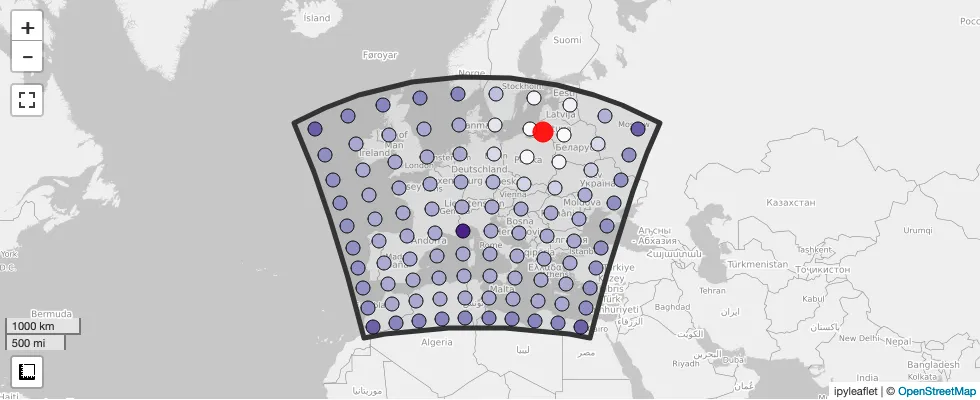
)New seismological receiver weight map plot.
p.viz.seismology.receiver_weights_map(
    data_selection_configuration="custom_windows"
)
Various part of SalvusProject can serialize functions to disc. This is now more powerful and easier to use as the serialized functions can now access closure values as well as other variables in the global scope of the functions which will also be serialized alongside. Thus external variables and imports will now work with these functions.
Basically it means that it should now just work in more cases without any extra work or rewrites.
The p.viz.seismology.misfit_map() method is now a widget and the event can
be selected interactively. Thus passing the event argument is no longer
necessary.
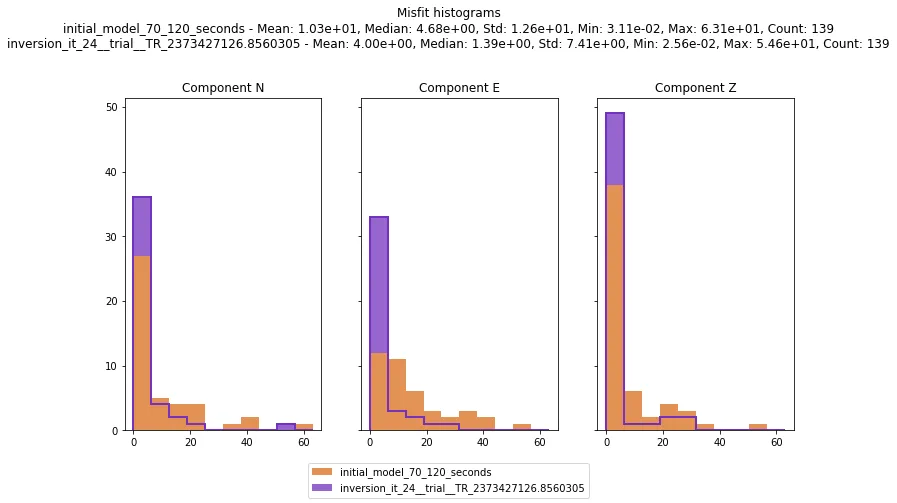
New method to visualize and compare histograms of misfits.
p.viz.misfit_histogram(
    simulation_configuration_a="initial_model_70_120_seconds",
    simulation_configuration_b=p.inversions.get_simulation_name(
            inverse_problem_configuration="inversion", iteration_id=25
    ),
    misfit_configuration="phase_misfit_70_120_seconds",
    events=p.events.list(),
    merge_all_components=False
)
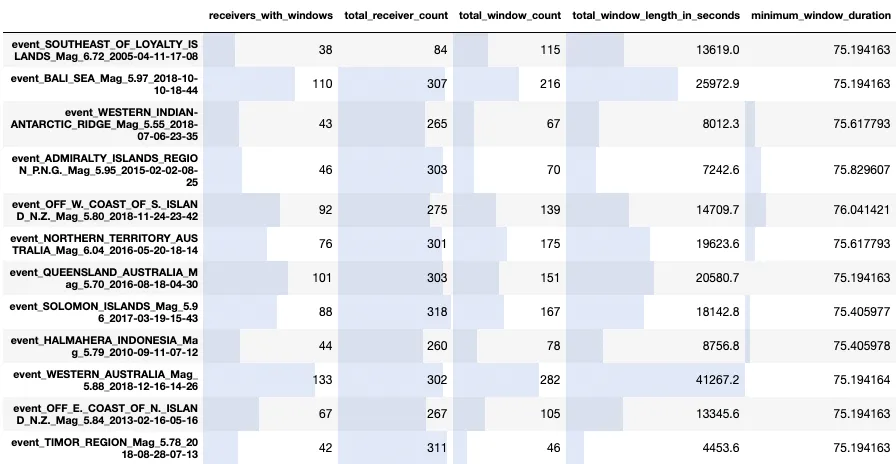
A few new utilities to analyze the statistics of interval windows.
One is the ability to get a pandas.DataFrame object containing statistics
about all windows for a list of events. This is very useful to do some custom
analysis and figure out which events to use in the final inversion.
df = p.entities.get(
    entity_type="data_selection_configuration", entity_name="selection_a"
).get_interval_window_statistics_table(events=p.events.get_all())
A styled version of this table with all events in a project can be visualized with:
p.viz.interval_window_statistics("selection_a")